
🎧 Companion Podcast
I tend to learn better by listening than reading. If you're the same, start here.
On November 25, 2025, an active malware outbreak disrupted the multi-campus educational environment. Within a three-minute window, the event escalated from a single suspicious file receipt to a coordinated investigation. However, as the evening unfolded, the technical challenge of analyzing code was quickly overshadowed by a far larger task: managing human panic, coordinating recovery across five campuses, and supporting parents, students, and staff late into the night.
This postmortem documents the timeline, technical findings, and—most importantly—the human side of incident response.
Update (July 2026): A second sample using the filename "តារាងប្រាក់ខែខែ.exe" ("Monthly Salary Table.exe") has now been observed in Cambodia. While the lure has been localized into Khmer, the underlying social engineering remains identical: exploiting employees' expectation of payroll-related documents. See the VirusTotal community report.
Incident Response Timeline
Threat Discovery
Received: "Lương tháng 11 + hoa hồng.exe" — One of the first recipients of the Telegram malware blast.
Technical Triage
Hash extracted and submitted to VirusTotal. Immediate malicious detections returned.
Investigation Begins
Compromised account traced and initial containment planning started.
Organization-Wide Alert
First bilingual warning issued. Distributed across staff, student, and parent communication channels.
Session Recovery Guidance
Published recovery procedures for compromised Telegram accounts.
First User Click Reports
Active user triage begins.
Community Support Escalates
Parent exposure reports begin. Direct support workload increases significantly.
Containment Operations
Campus-by-campus investigation and cleanup.
Support Operations Conclude
Final user support interactions completed. Incident response transitions to recovery.
Why This Incident Mattered
Most malware incidents are technical problems. This one became a trust problem.
The malicious file "Lương tháng 11 + hoa hồng.exe" was distributed through a compromised Telegram account used for parent communications. Because the message appeared to originate from a familiar and trusted source, recipients had little reason to immediately suspect malicious activity.
The challenge was not simply identifying the malware. It was restoring confidence in communication channels while simultaneously determining who had interacted with the file, who merely received it, and which accounts required recovery assistance.
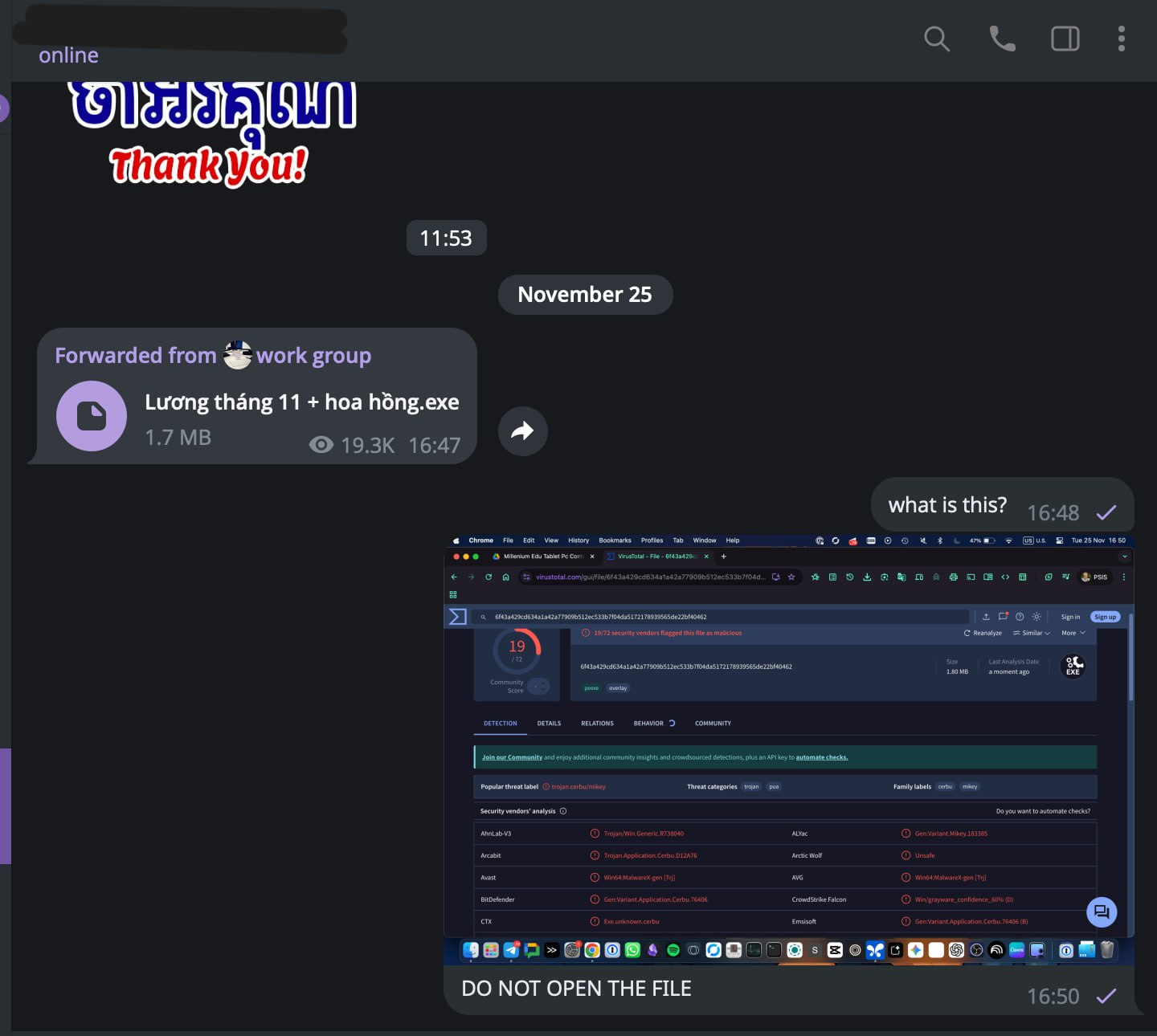
Lương tháng 11 + hoa hồng.exe distributed through a compromised Telegram account.
Emergency Broadcast
Within 21 minutes of initial detection, a bilingual emergency advisory was distributed across staff, student, and parent communication channels. The message explained how to identify the malware, instructed users not to open the file, and provided immediate containment steps for anyone who had already interacted with it.
The complete advisory is reproduced below as originally distributed.
[25/11/2025 17:08] Arttu Pitou At 🇰🇭អាតពិទូ:
⚠️⚠️⚠️ ការជូនដំណឹងបន្ទាន់ពីផ្នែក IT៖ មេរោគកំពុងរីករាលដាល (Urgent Security Alert from IT) សូមប្រុងប្រយ័ត្ន!
បច្ចុប្បន្នមានគណនីមួយចំនួនកំពុងបញ្ជូនឯកសារដែលមានផ្ទុកមេរោគ (Trojan) ចូលក្នុងគ្រុបការងារ និងការសន្ទនាឯកជន។សញ្ញាសម្គាល់៖
- ឈ្មោះឯកសារ៖
"Lương tháng 11 + hoa hồng.exe"(ឈ្មោះជាភាសាវៀតណាម)- ប្រភេទឯកសារ៖ វាជាឯកសារ
.exe(កម្មវិធី) មិនមែនជាឯកសារ Word ឬ PDF ទេចំណាត់ការបន្ទាន់៖
🚫 ហាមចុចបើក ឬទាញយក (Download) ជាដាច់ខាត។ ឯកសារនេះត្រូវបានរកឃើញថាជាមេរោគ (Malware/Trojan) ដែលអាចលួចទិន្នន័យ ឬបំផ្លាញកុំព្យូទ័ររបស់អ្នក。
🗑 ប្រសិនបើអ្នកទទួលបានសារនេះ សូមលុបវាចោលភ្លាមៗ។🚨 ប្រសិនបើអ្នកបានច្រឡំចុចបើកឯកសារនេះ៖
- ផ្តាច់អ៊ីនធឺណិតភ្លាមៗ៖ បិទ Wi-Fi ឬដកខ្សែ LAN ចេញពីកុំព្យូទ័ររបស់អ្នកជាបន្ទាន់។
- ទាក់ទងមកខ្ញុំជាបន្ទាន់៖ សូមឆាតមកខ្ញុំតាមរយៈតំណភ្ជាប់នេះ ដើម្បីឱ្យខ្ញុំជួយដោះស្រាយ 👉 https://t.me/atpitou
- ប្តូរពាក្យសម្ងាត់ (Passwords)៖ ប្រើប្រាស់ទូរស័ព្ទដៃដើម្បីប្តូរលេខសម្ងាត់ Telegram និង Email របស់អ្នក (ហាមប្តូរនៅលើកុំព្យូទ័រដែលឆ្លងមេរោគ)។
⚠️ URGENT IT SECURITY ALERT: Trojan Virus Circulating
Please be extremely careful. There is a malicious file currently being forwarded in Telegram groups and private chats.How to identify it:
- Filename:
"Lương tháng 11 + hoa hồng.exe"- File Type: Note that it ends in
.exe. This is an executable program, NOT a document.What you must do:
🚫 DO NOT CLICK, OPEN, or DOWNLOAD this file. Security scans confirm this is a Trojan/Malware. Opening it will infect your computer and compromise your data.
🗑 If you see this message, delete it immediately.🚨 IF YOU ACCIDENTALLY OPENED THE FILE:
- Disconnect from the Internet IMMEDIATELY: Turn off Wi-Fi or unplug your Ethernet cable.
- Contact IT Support Immediately: Message me directly at this link for assistance 👉 https://t.me/atpitou
- Change Your Passwords: Using your PHONE (not the computer), change your Telegram and Email passwords immediately.
Understanding the Threat Vector
Standard security training teaches users to watch for external email addresses, lookalike domains, and generic greetings. This campaign bypassed those filters by exploiting trusted relationships.
The malicious file was distributed from a compromised Telegram account used for front-desk and parent communications. Because that account was a member of numerous campus groups, a single compromised account was able to reach a large audience in a very short period of time.
During the incident, users reported both receiving the file and observing unauthorized activity from compromised Telegram accounts. Some users also executed the malware on Windows systems. However, the investigation did not establish a direct relationship between malware execution and the compromise of additional Telegram accounts, and the original method by which the distributing account was compromised remains unknown.
Because recipients received the file from a trusted and familiar source, their default suspicion was naturally lower. Users did not click the file because they were careless. They clicked it because the message appeared to originate from a legitimate school communication channel. The incident reinforced a practical security lesson: trust is often a more effective attack vector than technical sophistication.
Grounding the Chaos: Real-Time Triage
By 19:00 the investigation had become as much a support operation as a malware incident. While tracing indicators, validating reports, and coordinating with campuses, I was simultaneously handling a constant stream of direct messages from staff, students, and parents.
[17:08] Arttu: Please check [campus] Computers [for the source of compromised account]
[17:37] Campus Staff: School phone telegram
[17:37] Arttu: Sure it is phone and not PC?
[17:38] Campus Staff: [campus] Phone
[17:38] Arttu: Android?
[17:38] Campus Staff: Yes
One of the first challenges was determining whether a report involved a Windows infection, a compromised Telegram session, or a user who had simply downloaded the file onto a phone. The response path differed significantly in each case.
[18:42] Staff Member: Hello b
[18:42] Staff Member: I accidentally click on the link
[18:43] Arttu: [canned emergency response]
As reports increased, I relied heavily on a prepared bilingual response guide so that users received consistent instructions while I continued investigating the outbreak.
[19:16] Student: My mom tap on the virus link
[19:16] Student: I told her to delete it
[19:16] Arttu: On a computer or phone?
[19:16] Student: Phone
[19:17] Arttu: Ok.
[19:17] Arttu: [canned emergency response]
[19:22] Student: Thank teacher
Most security write-ups focus on infected devices. Much of this incident involved helping people understand what had happened, whether they were actually at risk, and what to do next.
[21:04] Arttu: Internet will go down while I clean the computers.
[21:04] Arttu: Did you click the file?
[21:39] Staff Member: Nope
[21:40] Arttu: Nope? 😂
[21:40] Arttu: Ahhh. Ok. Answers the did you click the file. 🙏
[21:40] Arttu: Sorry. My brain is on overdrive at the moment. 🥳
[21:41] Staff Member: No I didn't
I remained online answering messages, helping users recover accounts, validating reports, and coordinating response actions until approximately 1:00 AM.
Technical Investigation
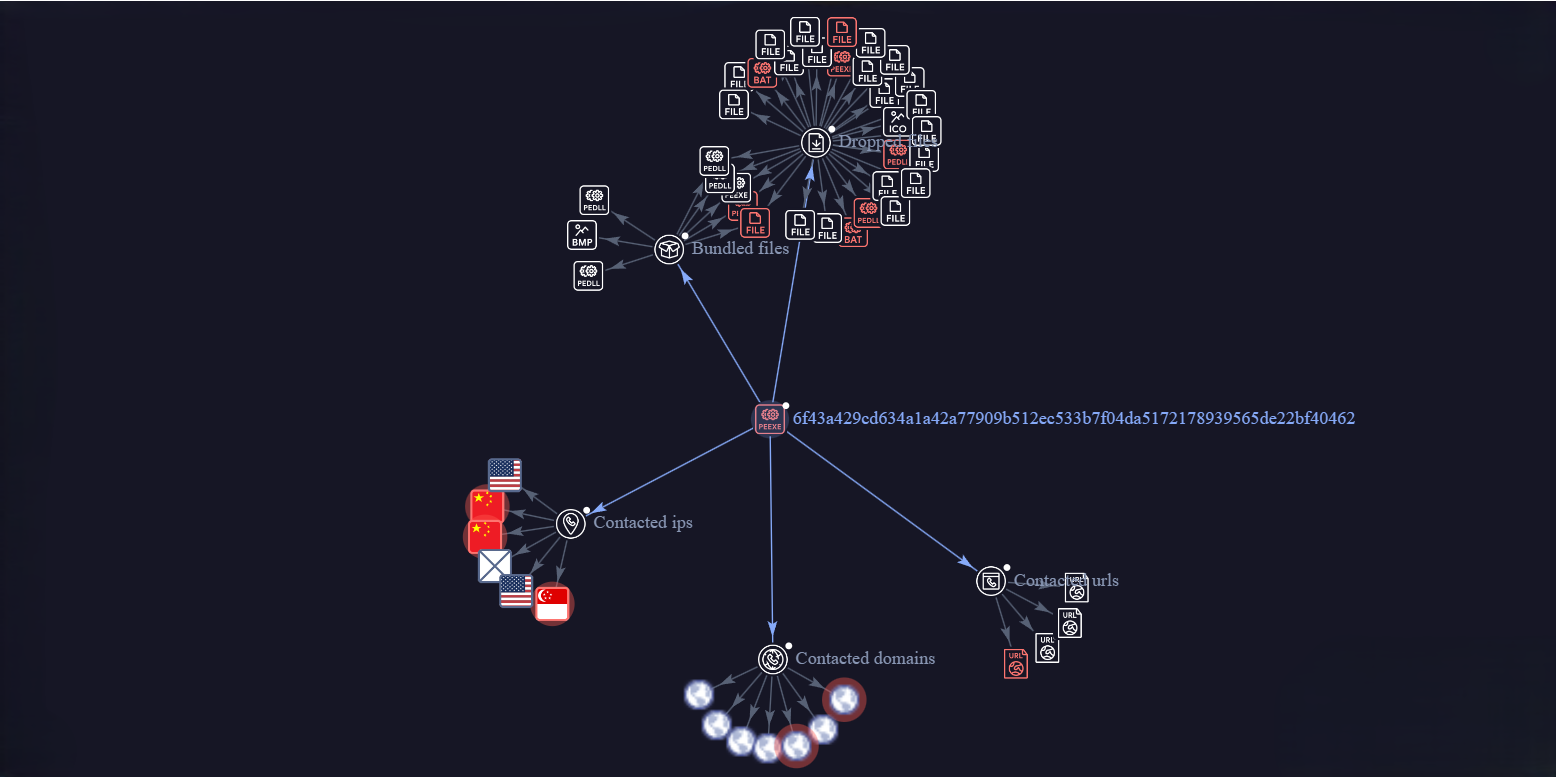
A sandbox review of the file Lương tháng 11 + hoa hồng.exe (SHA256: 6f43a429cd634a1a42a77909b512ec533b7f04da5172178939565de22bf40462) revealed a series of system modifications and process relationships.
Sandbox Observations
Based on sandbox execution reports (CAPE/Zenbox), I observed the following technical characteristics upon execution:
- Process Spawning & Shell Manipulation:
- The executable ran command-line instructions using a batch script:
cmd.exe /C ""C:\windows\MxgcIiXsde.bat"" - It initiated process enumeration and searches via
tasklist /fi "PID eq 6684"andfindstr.
- The executable ran command-line instructions using a batch script:
- Library Dropping & DLL Execution:
- The program dropped several files into temporary directories, including
nsis_tauri_utils.dll,System.dll, and a driver namedllama.sys. - It placed a payload DLL named
goldendays.dllunderC:\ProgramData\Roning\and executed it silently via:regsvr32.exe /S "C:\ProgramData\Roning\goldendays.dll" - It created a directory under
C:\Users\Public\Downloads\20251125115015\containing multiple files:1.bat,fhq.bat,hjk.txt,agg.txt,kill.txt, and1.dll.
- The program dropped several files into temporary directories, including
- System Service Registration:
- The malware registered and started a system service named `llama` pointing to the dropped driver (
llama.sys). - It registered a service named
MicrosoftSoftware2ShadowCop4yProvider.
- The malware registered and started a system service named `llama` pointing to the dropped driver (
- Network Activity:
- The system recorded attempt connections to a dead IP and local listening ports.
- Connections to external hosts were initiated for data egress and payload delivery.
The relationships and file dependencies are visualized in the interactive VirusTotal Graph below:
Note: If you see an empty blue rectangle above, reload the page. VirusTotal's embedded graph occasionally fails to render correctly after scrolling or lazy loading.
Detailed detection metrics and scanner signatures are documented on the VirusTotal Hash Page.
Recovery & Containment Guidance
To halt the propagation cycle and secure compromised accounts, I distributed a clear, sequential recovery checklist in both Khmer and English:
- Terminate Active Sessions: Open Telegram, navigate to Settings > Devices, and select Terminate all other sessions to force the attacker off the hijacked account.
- Enable Two-Step Verification (2FA): Set up a secondary password in Telegram (Settings > Privacy and Security > Two-Step Verification). This ensures that even if a session is hijacked in the future, the account cannot be accessed without the master password.
- Delete Malicious Messages: Remove the forwarded malware file from chat logs and groups to prevent other users from clicking it.
- Isolate Affected Workstations: Disconnect infected Windows PCs from the local network immediately to prevent lateral propagation.
- Change Credentials: Reset passwords for all sensitive organizational systems, performing the changes from a trusted, clean device.
Lessons Learned
Every active security incident offers critical lessons for future resilience:
- Trusted Contacts Bypass Training: Traditional phishing awareness is insufficient when threats originate from compromised, authenticated accounts belonging to friends, colleagues or school administration. Containment depends on verification speed.
- Speed Over Perfection: During an active outbreak, broadcasting a clear, timely warning is more valuable than waiting to compile a complete technical analysis.
- Bilingual Emergency Response: In multi-cultural organizations, security alerts and recovery checklists must be published in both native and international languages (Khmer and English) simultaneously to prevent communication lag.
- User Support is the Real Work: Analyzing malware behavior takes minutes; supporting hundreds of anxious people, triaging whether they are actually infected and walking them through recovery, and restoring organizational trust takes days of focused, empathetic labor.
- Clear Instructions Prevent Panic: Plain, numbered lists of recovery steps keep users focused on action rather than fear.
Reflections
The hardest part of this incident was not extracting file hashes or reviewing sandbox execution paths. The hardest part was active blast radius mapping while staying online until 1:00 AM to support panicked users, translating technical instructions, and providing a calm, reassuring voice to parents, students, and staff while the situation was still active.
Funnily enough, I had a scheduled Tablet deployment demo the next morning at 9:00 AM after troubleshooting the outbreak until 1:00 AM. So naturally I spent the night configuring ADB scripts until 8:30 AM. Security incidents do not respect operational calendars or provide sleep recovery windows; the next day still happens.
Practical incident response is not a laboratory exercise. It is a combination of rapid technical investigation, best effort communication and cross-departmental coordination.